Large-print music, tailored to each reader
Upload a PDF or MusicXML score. Largo re-engraves it for one specific low-vision musician: a bigger staff, thicker lines, fewer measures per line and bold text. You get a PDF ready for forScore, in minutes instead of hours.
Try it now — free during beta Get early access
No account. MusicXML stays in your browser. Runs on a phone, tablet or computer.
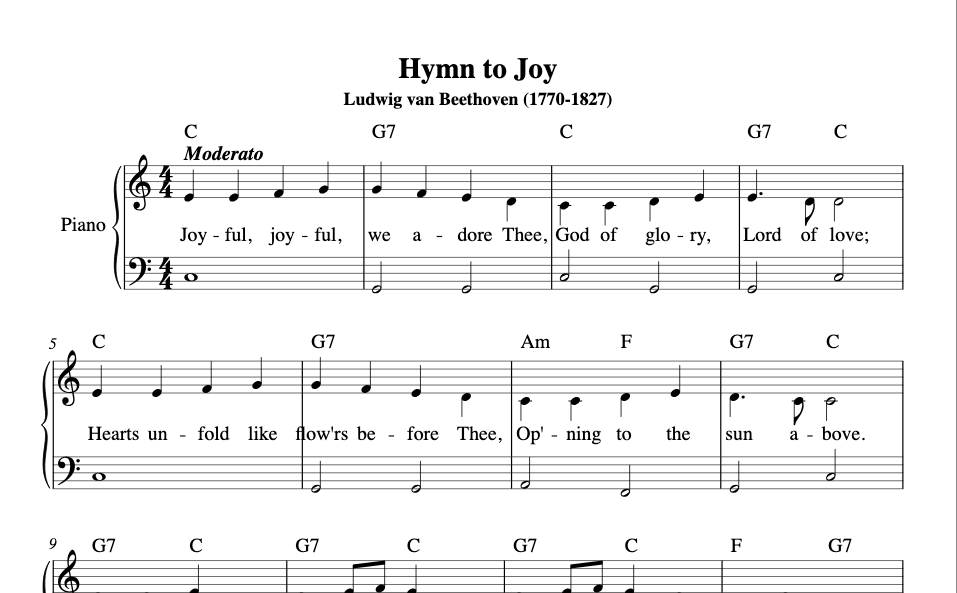 Standard print
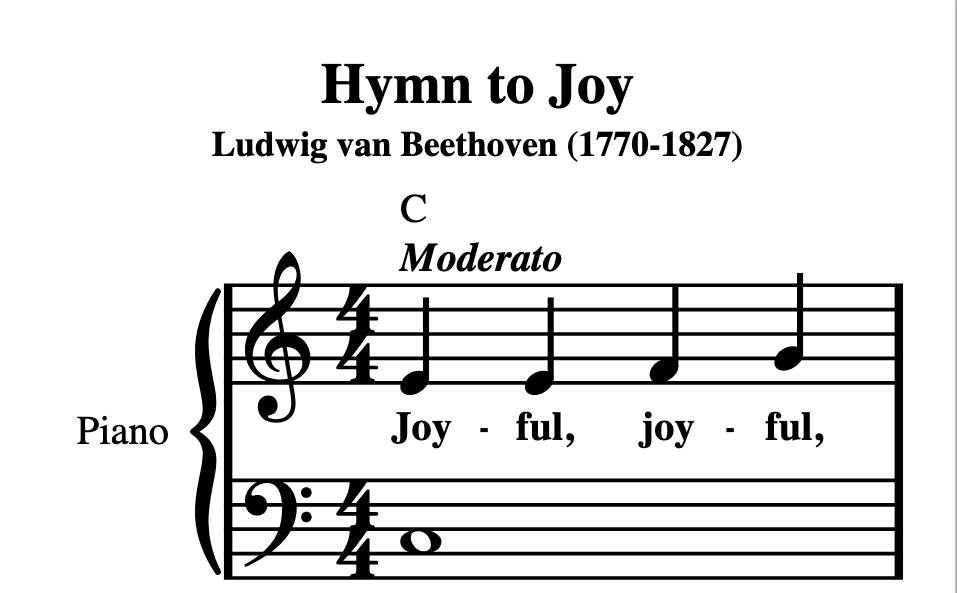 Largo, extra large
See it in 60 seconds
The problem: every low-vision musician needs a different score
A musician who cannot read standard print often needs modified stave notation: the same music, redrawn with a larger staff, heavier lines, more space and bold text. Today that is usually done by hand in notation software. One participant in a 2025 accessibility study described spending 10–15 hours a week on it.
Zooming into a PDF makes the page bigger but not better: the notes stay crowded and the lines stay thin. And there is no single “large print” size. A reader who needs 14 mm staves and a reader who needs 25 mm staves need two different scores of the same piece. Largo makes that a setting, not a project.
How it works
Add the score
Drop in a MusicXML file (free and unlimited, never leaves your browser) or a PDF / photo of a printed score, which Largo reads with optical music recognition (OMR).
Set the reader’s profile
Staff size from 7 to 32 mm, measures per line, line thickness, note spacing, text size and boldness, page size, and colors. Start from a preset: Large (UKAAF-style), Extra large, One line per page. Save it and share it as a link.
Check and download
Compare side by side with the original. Largo flags measures whose notes do not add up to the time signature, missing clefs and suspicious ties. Download a vector PDF for forScore, plus the MusicXML.
An honest comparison
| Largo | Re-typing in notation software | Zooming or “reflowing” a PDF | Lending libraries (NLS, RNIB) | |
|---|---|---|---|---|
| Your own piece | Yes, any score you have | Yes | Yes | Only titles already in the catalog |
| Time per piece | Minutes (MusicXML) or minutes plus checking (PDF) | Typically hours | Seconds | Request and wait |
| Re-spaces notes, thicker lines, fewer measures per line | Yes, from a saved profile | Yes, by hand | No: enlarges what is on the page | Fixed by the transcriber |
| Errors to watch for | PDF reading can misread notes; flagged measures to check. MusicXML is exact. | Typing mistakes | None added | Transcribed by people |
| Cost | Free during beta; planned from $9/month | Software license plus your time | Usually included in your score reader | Usually free or low cost |
Largo follows the ideas in the UKAAF guideline G009 for modified stave notation (enlarged symbols, heavier lines, no overlaps, bold text). It is not endorsed or certified by UKAAF, RNIB or NLS, and it does not replace a trained transcriber for performance-critical work.
Pricing
Free during beta — founding users keep a discounted price.
Individuals
$9/month, planned
For one reader. Includes PDF-reading (OMR) pages. MusicXML is always unlimited.
Teachers & ensembles
$29/month, planned
For a teacher or director preparing scores for several readers. Shared profiles, more PDF pages.
Right now
$0
Beta limits: PDF import is in limited beta (1 page per upload, 1 page per day per network, a small daily total). MusicXML is unlimited. No payment is collected on this site.
Questions
How accurate is reading a PDF?
Optical music recognition can make mistakes: wrong notes, missing accidentals, merged measures. Clean, printed scores work best; handwritten music and blurry photos do not. Largo flags measures whose note durations do not add up, missing clefs and suspicious ties, but a clean report is not a guarantee. Please check the music before a performance. MusicXML files carry the notes exactly and have no such risk.
Where do I get MusicXML?
Most notation programs export it (MuseScore, Finale, Sibelius, Dorico). Free sources include MuseScore.com, IMSLP (some scores), OpenScore and Mutopia. A MusicXML file keeps your score exactly as written.
Is my score uploaded anywhere?
MusicXML is processed in your browser and never uploaded. A PDF or image is sent to our server and on to Flat’s OMR service only when you press “Read this score”; it is erased from the service after reading. We keep a hashed network address, a hashed email and the page count so we can enforce beta limits. Your reader profile is saved only in your browser.
Can I use it with forScore on an iPad?
Yes. Choose the “iPad portrait (forScore)” page size, download the PDF and import it into forScore. The PDF is vector, so it stays sharp when you zoom.
What can I customize?
Staff size, measures per line, line/stem/barline thickness, note spacing, lyric and chord text size, bold text, page size (Letter, A4, Tabloid, A3, iPad), margins, lines per page, colors (black on white, cream or yellow; white or yellow on black), and whether to show chord symbols, lyrics and dynamics.
What are the beta limits?
MusicXML is unlimited. PDF import is in limited beta: 1 page per upload, 1 page per day per network and a small total per day, and it may be unavailable when our reading budget runs out. The PDF export uses standard PDF fonts (Times), so lyrics in non-Latin scripts are not yet supported.
Is it copyright-safe?
You are responsible for having the right to adapt the music you upload. Many libraries and publishers permit accessible copies for people with print disabilities; check the terms for your score. The example on this site is in the public domain.
Who is behind it?
Largo is built by a working musician. Write to felipealvarezmusic+largo@gmail.com.
Get early access
Tell us who the music is for. We will email you when the paid plans open and the founding discount is available. No spam, no sharing.